How to Do SEO for a Small Business Website: A Plain Checklist
Published · Comparisons
To do SEO for a small business website, verify your site in Google Search Console, submit a sitemap, give each service and each place you work its own page, write a clear and unique title and description for every page, answer the questions customers actually ask, link your pages to each other, make sure the site works well on a phone, and connect it to your Google Business Profile. Then measure in Search Console and keep improving. SEO takes weeks to months, and nobody honest can guarantee you a ranking.
CloserAccess wrote this guide and is one of the options in it, as a team that does SEO work on the sites it builds. Every Google fact below comes from Google's own Search Central and help pages, linked where it's stated. Facts checked November 16, 2026.
This guide covers one of six stages: Get found. CloserAccess is a team that runs all six, Set up, Brand, Build, Get paid, Get found and Run it, and you can hand us all of them or only the ones you need.
The checklist at a glance
| Step | What you do | Time to set up |
|---|---|---|
| 1. Search Console | Verify your site | Under an hour |
| 2. Sitemap | Submit it in Search Console | Minutes |
| 3. Pages | One page per service and per location you serve | A day or two of writing |
| 4. Titles and descriptions | Unique, descriptive, per page | An evening |
| 5. Helpful content | Answer real customer questions | Ongoing |
| 6. Internal links | Link related pages with clear anchor text | An hour |
| 7. Speed and mobile | Check on a phone, fix what's slow or broken | An afternoon |
| 8. Google Business Profile | Link it to your site and keep them consistent | An hour |
| 9. Reviews and mentions | Ask happy customers, get listed where it fits | Ongoing |
| 10. Measure | Read the Performance report monthly | 30 minutes a month |
What SEO can and can't do
Google is blunt about this. Its SEO starter guide says there's no guarantee any particular site will be added to Google's index, and that some changes take effect in a few hours while others take several months. For local results, Google's ranking help page says: "There's no way to request or pay for a better local ranking on Google."
So the goal is to make your site easy for Google to find and understand, and genuinely useful to the people who land on it. Anyone promising a number-one spot is promising something they don't control.
Step by step: SEO for your small business website
Step 1: Verify your site in Google Search Console
Search Console is Google's set of reports about how your site shows up in search. Google's verification help page describes two property types. A Domain property covers every version of your address (http, https, www and other subdomains) and can only be verified with a DNS record at your domain provider. A URL-prefix property covers one exact address and can be verified with an HTML file, a meta tag, or an existing Google Analytics or Tag Manager snippet.
If you can get into your domain settings, the Domain property gives the fuller picture.
Step 2: Submit your sitemap
A sitemap lists the pages you want Google to know about. Many website builders create one automatically. Submit it in Search Console's Sitemaps report, or add a `Sitemap:` line to your robots.txt file. Google's sitemap documentation calls submitting a sitemap "merely a hint", so think of it as a map you hand Google, not a ticket in.
Step 3: Give each service and each location its own page
If you do kitchen remodels, bathroom remodels and deck builds, a single "Services" page with three bullet points gives Google very little to match. Give each service a page that says what it is, who it's for, what's included, how long it takes, and how to book or request a quote. If you serve several towns, a page per town works only if each page says something real about working there: the jobs you've done, travel times, local details. Swapping the town name on identical pages doesn't help anyone.
Google's starter guide also suggests using descriptive words in your page addresses, so `/services/deck-building` beats `/page?id=47`.
Step 4: Write titles and descriptions for every page
Your page title is usually what people see as the blue link in Google. Google's title link guidance asks for titles that are descriptive, concise and unique to each page, with your brand name kept short and no keyword stuffing. Google may rewrite a title it finds vague, outdated, or nearly identical to other pages on your site.
The meta description is the short summary under the link. Google's snippet guidance says to write a unique, accurate summary for each page, and notes that Google mainly builds snippets from the page content and uses your description only when it describes the page better. There is no fixed length limit, but long descriptions get cut off.
A pattern that works: Service + place | Business name for the title, and one or two plain sentences on what you do, for whom, and what to do next for the description.
Step 5: Write content that helps people
Google's guide to helpful content asks whether your audience would find the page useful if they came straight to it, whether it shows first-hand expertise, and whether readers leave having learned enough to reach their goal. It also says Google doesn't prefer a particular word count.
For a small business, helpful content usually means:
- An FAQ that answers the questions you get on the phone every week.
- Before-and-after examples or project write-ups, with real photos.
- Clear service areas, hours, and what happens after someone books.
- A blog post when you have something worth saying, such as a seasonal checklist or a guide to choosing between two options.
Write the words customers use. The starter guide suggests thinking about how both beginners and experts would search, such as "AC not cooling" as well as "condenser repair".
Step 6: Link your pages to each other
When your home page mentions deck building, link the words "deck building" to the deck page. Google's starter guide recommends descriptive anchor text so people and Google know what's on the other end. Avoid "click here". Link from service pages to your contact or booking page, and from blog posts to the service they relate to.
Step 7: Check speed, mobile and security
Open your site on a phone. Can you read it without zooming? Does the menu work? Is the phone number tappable? Google's page experience guidance asks whether content displays well on mobile, whether pages are served over HTTPS, and says to avoid intrusive pop-ups. It also says good Core Web Vitals scores don't guarantee top rankings, and that chasing perfect scores just for SEO may not be the best use of your time. Fix what's clearly slow or broken, then move on.
Step 8: Link your Google Business Profile
For a local business, your Google Business Profile is how you show up on Google Search and Maps. Add your website address to it, and make sure your business name, address or service area, phone and hours match your site exactly. Google's Business Profile editing help notes that your website shouldn't block Googlebot. Our guide on how to set up a Google Business Profile covers the profile step by step.
Google's ranking page names three local factors: relevance, distance and prominence. Prominence includes how many sites link to you and how many reviews and positive ratings you have.
Step 9: Earn reviews and real mentions
Ask happy customers for a review, every time, in a way that's easy for them. Reply to reviews, good and bad. Then get listed where your customers look: your trade association, your chamber of commerce, local event pages, suppliers' "where to buy" pages. Our guide on how to get more customer reviews goes deeper.
Common mistake: paying for reviews. Google's review guidance says offering free or discounted goods or services in exchange for reviews is strictly prohibited.
Step 10: Measure, then improve
Once a month, open Search Console's Performance report. It shows clicks, impressions, click-through rate and average position, and you can group the data by the searches people typed and by page. Look for:
- Searches where you appear often but few people click. Rewrite that page's title and description.
- Services people search for that you don't have a page for. Write one.
- Pages that dropped. Check if something changed.
Google's starter guide suggests waiting a few weeks before judging whether a change worked.
Which route fits you
| Route | Who does the work | Best for |
|---|---|---|
| Do it yourself | You, with Google's own docs and Search Console | Owners who like learning and can give it a few hours a month |
| Freelancer | One SEO specialist | A defined project, such as a site audit or rewriting service pages |
| SEO agency | A team with reporting and outreach | Businesses competing in many locations or crowded markets |
| Done-for-you team (CloserAccess) | The team that builds your site, with SEO built into the work | Owners who want the site, the Google profile and search work handled together |
DIY works well if you have a small number of services, a defined local area, and the patience to write and wait. Everything in this checklist can be done by the owner.
An SEO agency or freelancer fits when you already have a site you're happy with and want specialist help on it. Our guide on how to find an SEO agency for a small business lists what to ask before you hire, and why a ranking guarantee is a warning sign.
CloserAccess fits when you want search handled as part of the whole business. Its Get found stage covers search (SEO), your Google profile, the CloserAccess directory, a blog, social posting, ads, video, and email and text campaigns. Sites the team builds get a sitemap and product and event data search engines can read. Starlets, a Queens venue whose nights each have their own page, is one example of a site built this way.
What we would take off your plate
Search is one part of Get found, and it only works when the site is good. We can set up the domain and email (Set up), shape the brand (Brand), build the site search engines can read (Build), take payments and bookings through your own Square account (Get paid), and keep posting and updating (Run it).
Do what you love. We'll run the rest. Start here.
What it looked like for businesses we work with
These are dated numbers from each business's own Google Search Console, not a promise of what you will get. Results depend on your market, your site and your timing, and nobody can guarantee a position on Google.
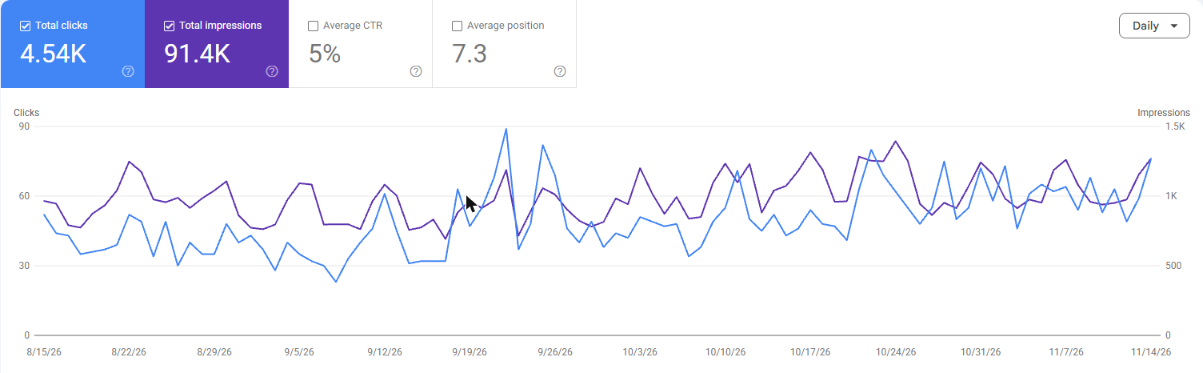
Starlets (Queens venue). From August 15 to November 14, 2026, Starlets' site had 4.54K clicks and 91.4K impressions from Google Search, at an average position of 7.3. Most of those searches were for the venue by name.
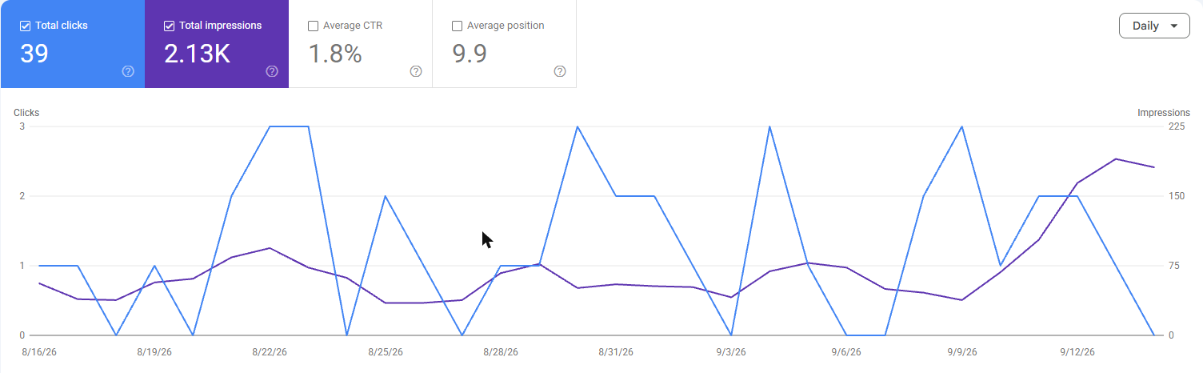
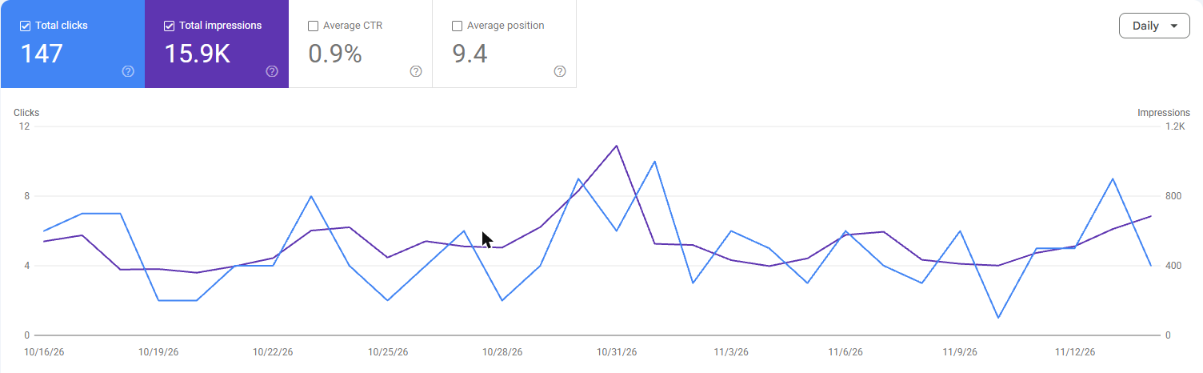
Klub Kingz (party crew). From August 16 to September 14, 2026, the site had 39 clicks. From October 16 to November 14, 2026, it had 147, about 3.8 times as many, at an average position of 9.4.
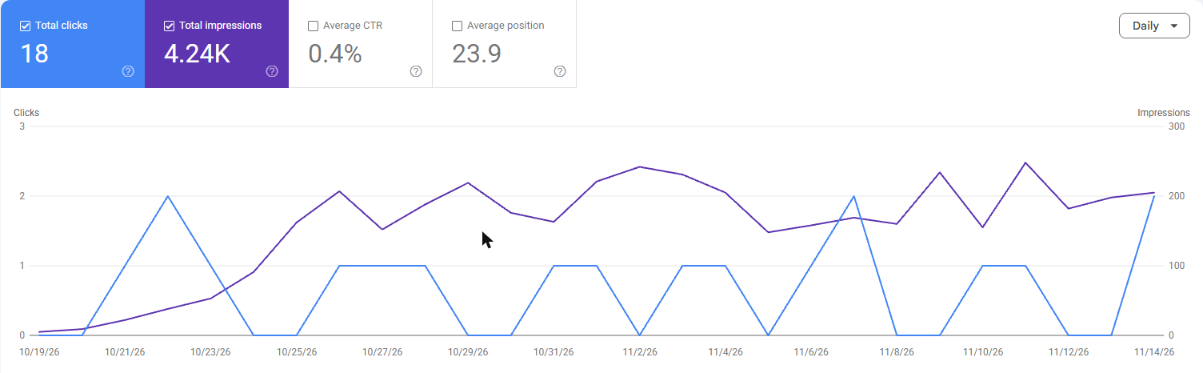
GlobePro Restoration. Search Console showed no data for August 16 to September 14, 2026. From October 16 to November 14, 2026 it showed 18 clicks and 4.24K impressions, at an average position of 23.9. That is a small start, not a finished result.
When CloserAccess isn't the right fit
- You only want SEO on a website you already own and plan to keep. A specialist SEO freelancer or agency is the better match.
- You want a guaranteed position on Google. Nobody honest offers that, including us.
- You want to learn and do it all yourself. This checklist and Google's own docs are enough to start.
Frequently asked questions
How do I get my website on Google?
Verify your site in Google Search Console and submit your sitemap, then link to the site from your Google Business Profile and social accounts. Google says indexing isn't guaranteed and that changes can take from hours to months to show.
How long does SEO take for a small business?
Google's own guide says some changes show within hours and others take several months, and suggests waiting a few weeks before judging a change. Plan in months, not days, and keep working on it.
Can I do SEO for my small business myself?
Yes. Everything in this checklist can be done by an owner using Google's own documentation and Search Console. What it takes most is time and consistency.
What is the most important SEO step for a local business?
There isn't one magic step, but two cover a lot of ground: a clear page for each service you offer, and an accurate Google Business Profile that matches your website. Google says local results depend on relevance, distance and prominence.
Can anyone guarantee a first-page ranking on Google?
No. Google says there's no guarantee a site will be indexed, and that there's no way to pay for a better local ranking. Treat any guarantee as a warning sign.
Do meta keywords still matter for SEO?
No. Google's SEO starter guide says Google Search doesn't use the keywords meta tag. Spend that time on titles, descriptions and the page content instead.
Want search handled with the rest of the business?
If you'd rather have a team handle the site, the profile and the search work together, see how CloserAccess works for businesses and talk to the team.
Do what you love. We'll run the rest.