How to Get a Website Built for Your Business: A Step-by-Step Guide
Published · Comparisons
To get a website built for your business, first choose who builds it: you on a DIY website builder, a freelance web designer, a web agency, or a done-for-you team that builds and then runs the site. Then write a one-page brief, make sure your domain and every login are in your own name, check past work and references, agree in writing on what "done" means, and plan who keeps the site updated after launch.
CloserAccess wrote this guide and is one of the options in it, as a done-for-you team. The steps work whoever you hire. Facts checked November 16, 2026.
This guide covers one of six stages: Build. CloserAccess is a team that runs all six, Set up, Brand, Build, Get paid, Get found and Run it, and you can hand us all of them or only the ones you need.
Steps at a glance
| Step | What you do | Time it takes you |
|---|---|---|
| 1. Pick a route | Decide between DIY, freelancer, agency or a done-for-you team | An evening |
| 2. Write a one-page brief | What the site must do, for whom, with which pages | One to two hours |
| 3. Decide what you must own | Domain, hosting login, content, analytics | An hour to set up |
| 4. Find and vet people | Three to five candidates, real sites, references | One to two weeks |
| 5. Ask the right questions | Process, timeline, who does the work, what happens after launch | A call per candidate |
| 6. Launch with a checklist | Test forms, payments, phones, search setup | A day of testing |
| 7. Plan for after launch | Who updates, fixes and backs up the site | Ongoing |
Step 1: Pick the route that fits how you work
There are four common ways to get a business website, and the right one depends on how much of your own time you want to spend, now and every month after.
- A DIY website builder. You pick a template and do the work. It suits people who like this kind of thing and have a simple site in mind. Our guide on how to build a business website yourself walks through it.
- A freelance web designer. One person designs and builds the site. Good freelancers are fast and personal. The risk is that everything depends on one person's schedule.
- A web agency. A team with designers, developers and a project manager. Agencies suit bigger or more custom projects and usually run a structured process with set review rounds.
- A done-for-you team. A team builds the site and then keeps running it with you: updates, payments, bookings, search and marketing. CloserAccess works this way.
A useful test: write down what the site has to do. If the answer is "show who we are and how to reach us," almost any route works. If it has to take bookings with deposits, sell products, sell tickets or run memberships, you want a builder or a team that has those features ready, rather than someone stitching plugins together.
Step 2: Write a one-page brief
A brief is the single most useful thing you can bring to any web designer. It cuts quotes and calls short, and it lets you compare candidates on the same job. Keep it to one page:
- The business in two sentences. What you sell, to whom, where.
- The main job of the site. "Get people to book a consultation" or "sell our sauces online" or "fill Friday nights."
- The pages you need. Home, services or menu, about, contact, plus anything special: booking, shop, events, gallery, blog.
- What it has to connect to. Your payment account, your calendar, your email list, your social accounts.
- What you already have. Logo, photos, video, written copy, an old site. Be honest about gaps.
- Three sites you like and why. Point at specifics: "the menu is easy to read on a phone."
- Your timeline, and any date that matters, like an opening or a season.
- Who on your side makes decisions, so feedback doesn't stall.
Common mistake: leaving out what the site has to connect to. Payments and bookings change the whole build, so mention them up front.
Step 3: Decide what you must own before anyone starts
This is the step people skip and regret. Whoever builds your site, these should be in your business's name, with you holding the login:
- Your domain name. Register it in your own name at a registrar, with your email on the account. If you ever move it to another company, you'll need a transfer code from your registrar; ICANN, the body that coordinates domain names, describes it as a code your registrar creates to identify the domain holder and prevent unauthorized transfers. If a designer registers the domain for you, make sure you're listed as the registrant.
- Hosting or platform login. Even if someone else manages it, you should be able to log in or get your content out.
- Your content. Your words, photos, logo files and videos. Agree in writing that you own what you paid to have made.
- Search and analytics accounts. In Google Search Console, the owner role has full control of a property, while full and restricted users have less. You should be an owner; your designer can be a user.
- Payment and booking accounts. The account that receives customer money should be your own business account.
On CloserAccess, card payments go through your own Square account, so the money settles there, and the site lives on your own address.
Step 4: Find and vet the people who could build it
Where to look:
- Sites you admire in your area or industry. Many have a "site by" credit in the footer. If not, ask the owner who built it.
- Referrals from other owners, especially ones in a business like yours.
- Directories and portfolios for freelancers and agencies.
- Teams that work with your kind of business. The CloserAccess directory lists businesses whose sites the team built, so you can see real work before you call.
How to vet, in about two weeks:
- Shortlist three to five candidates.
- Open their live client sites on your phone. Check that they load fast, read clearly and that the buttons work. A portfolio screenshot tells you much less than a working site.
- Ask for two references and actually call them. Ask what went wrong and how it was handled.
- Send each the same one-page brief and compare the replies. Good replies ask you questions back.
Step 5: Ask these questions before you sign
- Who will actually do the design and the build? Will I talk to that person?
- What's the timeline, and what do you need from me, by when?
- How many rounds of changes are included, and what counts as a change?
- Will I be able to edit words, photos, hours and prices myself? Show me the editor.
- Where is the site hosted, and who handles security updates, SSL and backups?
- Do you do search setup (titles, descriptions, a sitemap, Google profile help) as part of the build?
- What happens after launch if something breaks, or I need a new page?
- If we stop working together, how do I take my domain, content and site with me?
- How is the cost structured? Get a written quote with what's included and what isn't.
On cost, ask for a fixed quote tied to the brief, so you're comparing the same job. At CloserAccess, every plan has a one-time build fee and a monthly fee, and you get a fixed quote after a short call; it's also free to start self-serve, with a fee only when a customer pays you.
Step 6: Launch with a checklist
Before you announce the site, spend a day testing it as a customer would:
- On a phone first. Anyone who taps a link in your social bio or your Google profile arrives on one.
- Every form. Send a test message and check that it reaches you.
- Payments and bookings. Make a real small purchase or booking end to end, then refund it.
- Contact details. Phone number, address, hours and map pin, all correct.
- Search basics. Each page has its own title and description, the site has a sitemap, and it's added to Google Search Console under your account. Google's own starter guide says some changes can take effect in a few hours and others several months, so don't expect search traffic on day one.
- Your Google Business Profile points to the new site.
- Old links. If you had an old site, its main pages should redirect to the new ones.
Step 7: Plan what happens after launch
A website is closer to a storefront than a brochure. Hours change, menus change, prices change, and software needs updates. Before you sign, settle:
- Who updates content. You, through an editor, or the team on request.
- Who handles hosting, SSL, backups and security updates.
- Who keeps working on search, like new pages, blog posts and your Google profile. Our guide on doing SEO for a small business website covers what that involves.
- How you ask for changes, and how fast they happen.
Budget your own time too. Even with a team doing the work, plan on about an hour a month to send updates, photos and news.
Which route fits you
| Route | Who builds it | Who keeps it running | Best for |
|---|---|---|---|
| DIY website builder | You | You | Simple sites, owners who enjoy doing it |
| Freelance web designer | One person | Usually you, or the freelancer by arrangement | A clear, contained project and a designer you trust |
| Web agency | A team | You, or the agency under a separate agreement | Large or highly custom projects with a set process |
| Done-for-you team (like CloserAccess) | A team | The team, with you editing what you want | Owners who want bookings, payments, search and marketing handled together |
Freelancers and agencies are a great fit when you mainly need a beautiful site and already have people for payments, marketing and upkeep. DIY is a good fit when you have more time than budget and the site is simple.
CloserAccess covers six stages, and you can hand over all of them or only the ones you need: set up (we walk you through the LLC and EIN, business bank account, merchant account, domain and business email), brand, build, get paid, get found, and run it. The build includes what the business needs on it, like bookings, a shop, tickets, menus, memberships or courses. Plans run from Starter (a site on your own address with hosting, SSL, backups and updates handled, contact forms that email and text you, and your own admin) up through Growth, Pro and a fully custom build. Every plan includes direct access to your development team. See what each plan includes.
What we would take off your plate
The site is the middle of the job, not all of it. We can walk you through Set up (domain, email, business accounts) and Brand first, then Build, then Get paid through your own Square account, Get found, and Run it after launch.
Do what you love. We'll run the rest. Start here.
What it looked like for businesses we work with
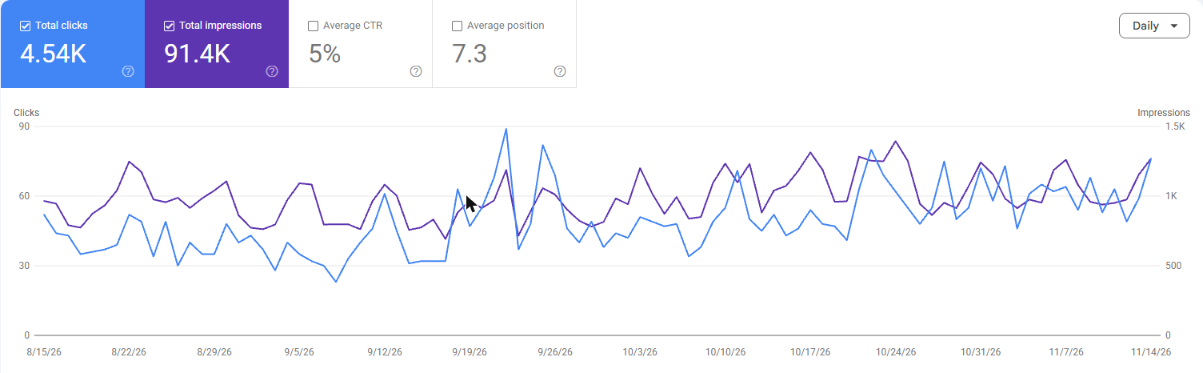
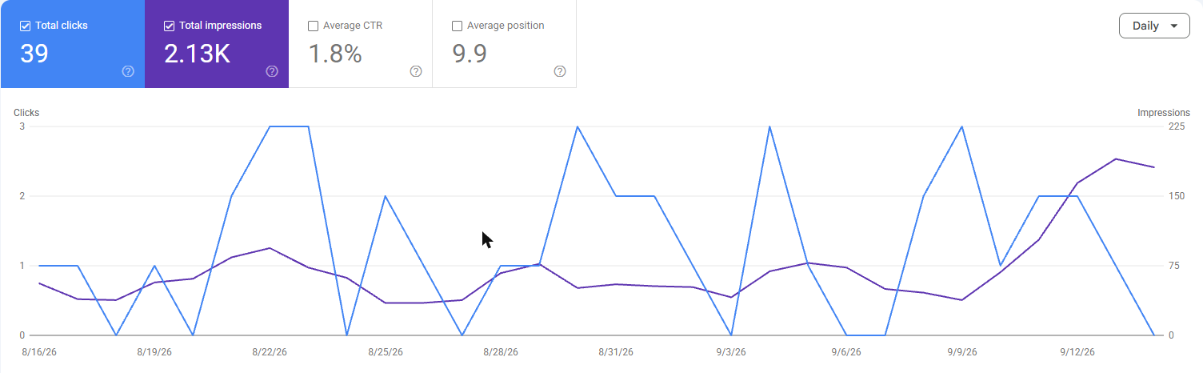
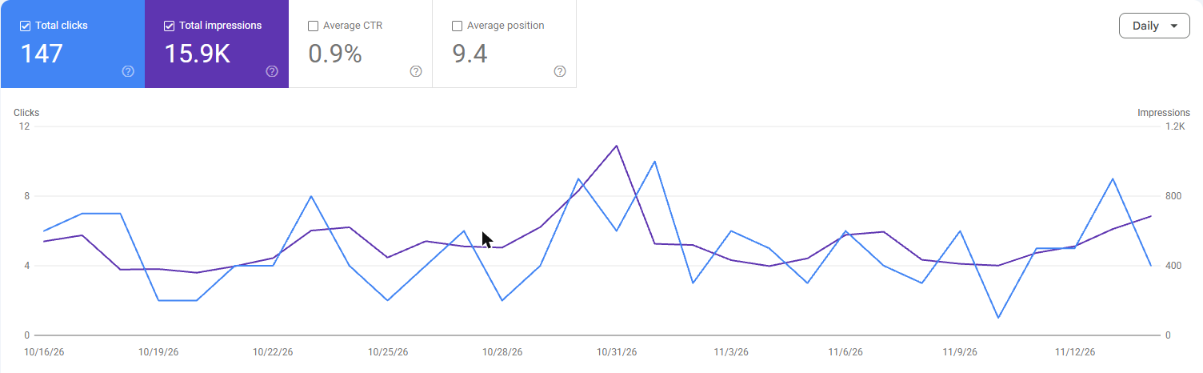
These are dated numbers from each business's own Google Search Console, not a promise of what you will get. Results depend on your market, your site and your timing, and nobody can guarantee a position on Google.
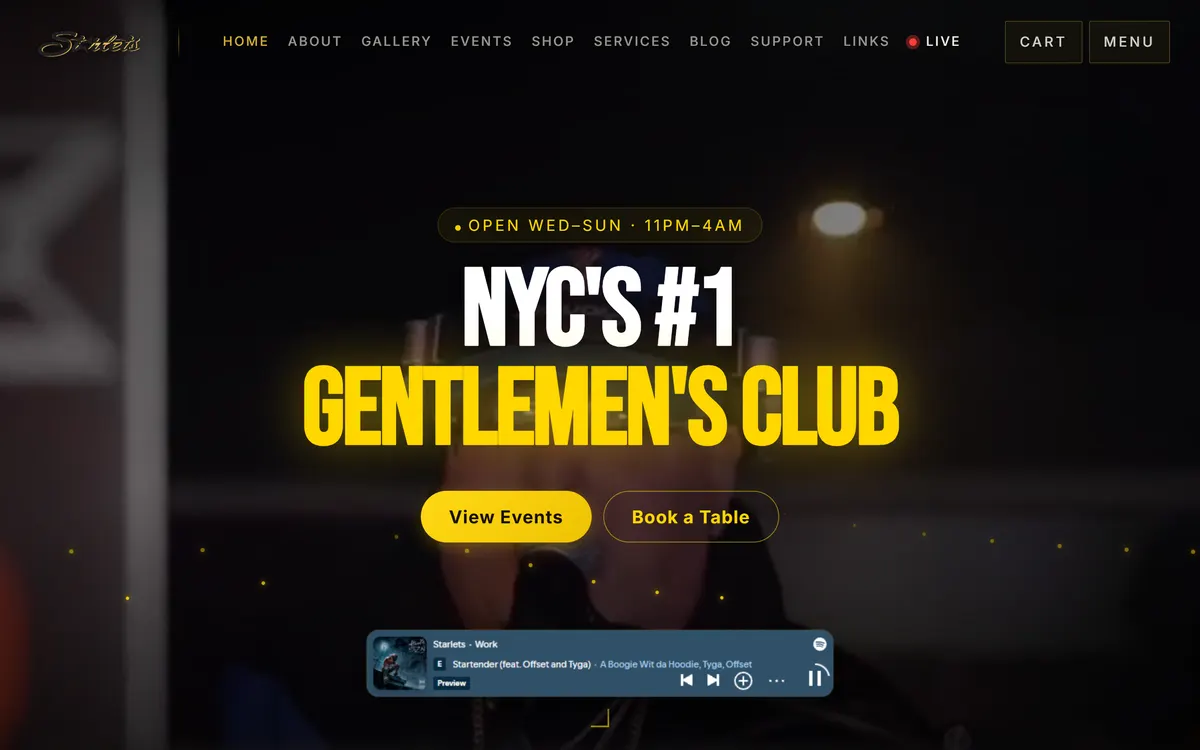
Starlets (Queens venue). From August 15 to November 14, 2026, Starlets' site had 4.54K clicks and 91.4K impressions from Google Search, at an average position of 7.3. Most of those searches were for the venue by name.
Klub Kingz (party crew). From August 16 to September 14, 2026, the site had 39 clicks. From October 16 to November 14, 2026, it had 147, about 3.8 times as many, at an average position of 9.4.
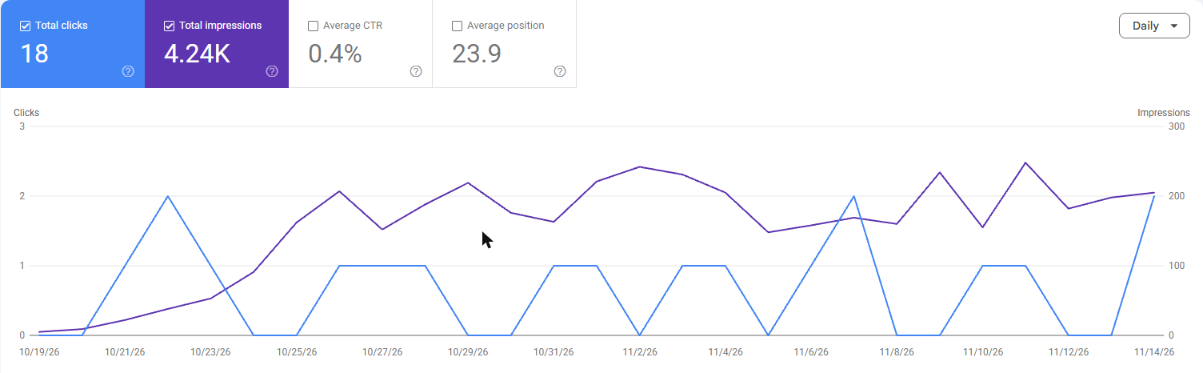
GlobePro Restoration. Search Console showed no data for August 16 to September 14, 2026. From October 16 to November 14, 2026 it showed 18 clicks and 4.24K impressions, at an average position of 23.9. That is a small start, not a finished result.
When CloserAccess is not the right fit
- You want to build it yourself, by hand. Use a DIY builder; you'll enjoy it more.
- You need only a one-page site and nothing else, and you'll never take payments or bookings on it.
- You need payments through something other than Square. Card payments on CloserAccess run through your own Square account.
- You already have a web team and a marketing team you're happy with. Keep them.
- You want legal, tax or banking advice. We walk you through setup steps, but for those questions check your state's rules or ask a professional.
Frequently asked questions
How do I get a website built for my business?
Choose a route (DIY builder, freelancer, agency or a done-for-you team), write a one-page brief, keep your domain and logins in your own name, vet three to five candidates by their live sites and references, and agree in writing on scope, timeline and who maintains the site after launch.
How do I hire a web designer for a small business?
Shortlist designers whose live sites you like, send each the same one-page brief, call two references for your top picks, and ask who does the work, how many rounds of changes are included, and what happens after launch. Get a written quote that lists what's included.
Who builds websites for small businesses?
Owners themselves on website builders, freelance web designers, web agencies, and done-for-you teams that build the site and keep running it. The best choice depends on how much of your own time you want to spend and what the site has to do.
How long does it take to get a business website built?
It depends on the size of the site and how quickly you supply content and feedback. Plan one to two weeks to find and vet someone, then the build itself, then a day of testing before launch. Gathering photos and copy is often the slowest part, so start early.
Should I own my domain name if someone else builds my website?
Yes. Register the domain in your business's name with your own email on the account, so you can move it later. Moving a domain to another registrar needs a transfer code from your current registrar.
What should I ask a web designer before hiring them?
Ask who does the work, the timeline, what they need from you, how many revision rounds are included, whether you can edit the site yourself, who handles hosting and backups, whether search setup is included, and how you'd take your site with you if you part ways.
What happens after my website launches?
Someone has to keep content current, apply updates, keep backups and keep working on search. Decide before you sign whether that's you, your designer under a separate agreement, or a team that runs the site with you.
Next step
If you'd like a team to build the site and run the parts you'd rather not, see how CloserAccess works for businesses and talk to the team. If you'd rather hire separately for search or marketing, our guides on how to find an SEO agency and how to find a marketing agency cover what to ask.
Do what you love. We'll run the rest.