Sign in and find your way around the admin
How to sign in to your admin, how the menu is organised, and where to get help. Start here if you are new to running your site.
Where to find it: /admin in your admin.
Sign in to your admin
Your admin lives on your own site's address. Your account belongs to your site only, so an admin login for one site will not work on another site's address.
- Go to your site's address and add /login, for example yoursite.com/login.
- Enter your Email and Password, then click Sign In.
- After you sign in you land on your profile page, not the admin. Go to your site's address and add /admin, for example yoursite.com/admin.
- Bookmark that page so you can come straight back next time.
If you see Invalid email or password., check for typos and try again. If you see User not found., make sure you are on your own site's address.
Reset a forgotten password
- On the sign-in page, click Forgot your password?.
- Enter your Email and click Send Reset Link.
- Open the email and click the link. It works for 1 hour.
- Enter a New Password, type it again in Confirm Password, and save.
- Your new password needs 8 to 128 characters, with at least one lowercase letter, one uppercase letter, one number and one symbol.
- Asking for a new link cancels any older link you haven't used.
- You can ask for up to 3 links an hour. After that you'll see Too many requests. Please try again later.
How the menu is organised
On a computer, the menu sits down the left side under the heading Menu. Items are grouped by what you're trying to do.
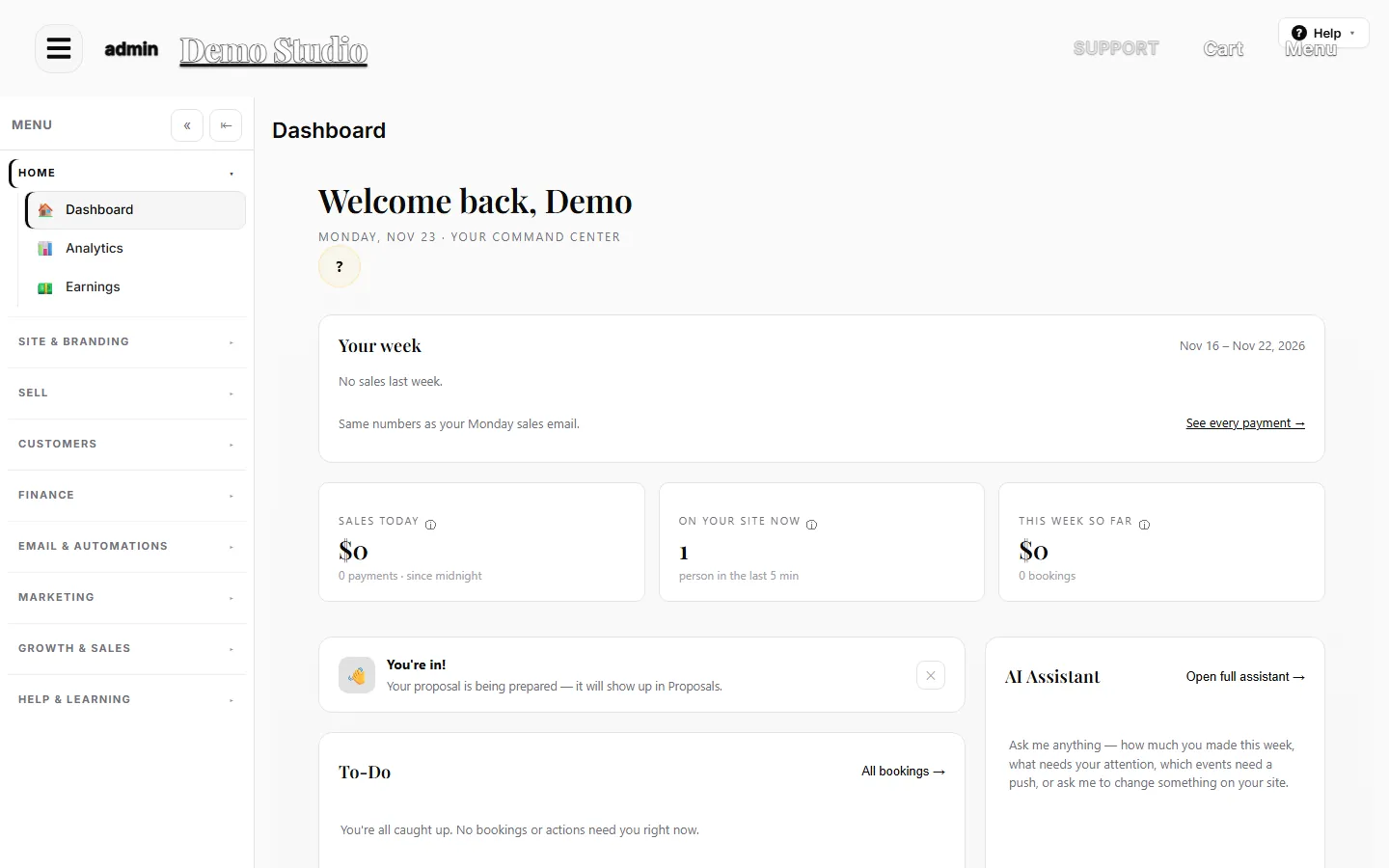
| Group | What you'll find there |
|---|---|
| Home | Setup (only until setup is done), Dashboard, Analytics and Earnings. |
| Site & Branding | Appearance, Modules, Business Timezone, Notifications, AI Agent Access, plus AI and chat tools when they're turned on. |
| Sell | What you sell, such as your shop, services, events, courses, music, gallery and blog. Each shows once it's turned on. |
| Customers | Your people and memberships. |
| Finance | Payments, tips, disputes and refunds. |
| Email & Automations | Email campaigns, newsletters, automations, your audience and text outreach. |
| Marketing | Social, ads, reviews, Google Business, referrals and tracking. |
| Growth & Sales | Lead finding, the phone agent, promoters and rewards. |
| Help & Learning | Learning Center, Tutorials, Support Tickets, Documents, Proposals and Plan & Billing. |
You only see menu items for features that are turned on. To add a feature, turn it on in Modules. Staff members only see the pages their role allows.
- Click Minimize menu (Ctrl+B) at the top of the menu to shrink it to icons. Click it again to expand.
- Use the hide button to tuck the menu into the left edge. A small » handle stays on the edge; click it to bring the menu back.
- On a phone or small screen, tap the » handle on the edge of the screen to open the full menu. Type in Search the menu to find a page fast, and tap Close when you're done.
- Your admin remembers how you left the menu in this browser.
Search and keyboard shortcuts
Press Ctrl+K (or ⌘+K on a Mac) on any admin page to open the search box. Type part of a page name, a tour name, or a word like "help". Use the up and down arrows to pick a result, Enter to open it, and Esc to close.
| Keys | What it does |
|---|---|
| Ctrl+K (⌘+K on Mac) | Opens search. Works even while you're typing in a field. |
| / | Opens the menu. |
| Ctrl+S | Opens or closes the menu. |
| Ctrl+D | Goes to the Dashboard. |
| Ctrl+B | Shrinks the menu to icons and back. |
| Esc | Closes menus, dialogs and tours. |
Get help
Every admin page has a Help button at the top right. Click it to see:
- Take a tour: shows only when the page you're on has a guided tour.
- Learning Center: every guided tour and written guide in one place. See Learning Center and tours.
- Keyboard shortcuts: a quick list of the shortcuts above.
The Help menu also has Contact support. That opens your Support Tickets page, which is the inbox of messages your own customers sent you. See Support Tickets.
Questions
I signed in but I don't see the admin. Where is it?
After signing in you land on your profile page. Add /admin to your site's address to open the admin.
Can I use the same login on two sites?
No. Each account belongs to one site. Sign in on the site where your admin account was created.
Why is a menu item missing?
Menu items only show for features that are turned on. Turn the feature on in Modules. If you're a staff member, your role may not include that page; ask the owner.
Ctrl+D doesn't work on my Mac.
Hold Control, not ⌘, for D, S and B. Only K works with ⌘.